

在现代商业环境中,拥有一款适合携带笔记本电脑的托特包不仅是一种时尚选择,更是商务生活中不可或缺的重要工具。托特包的设计兼备便利性和时尚感,但选择适合自己需求的产品则需要关注多个关键因素。本篇文章将指导您如何根据笔记本电脑的尺寸、托特包的保护性能、舒适性和附加功能等方面,作出明智的选择。我们将从精确测量笔记本尺寸开始,随后探讨隔层的保护性能、托特包与背包在健康和舒适度上的比较、附加功能的实用性,最后根据不同的使用场景选择最合适的托特包。这些章节将为您提供全面的视角,帮助您找到真正符合您的商务需求和个人风格的托特包。
精确测量与尺寸匹配:为笔记本选择合适托特包的实用指南

测量与匹配要点
为笔记本挑选托特包,第一步始终是精确测量设备的物理尺寸。不要只看“适合15英寸”这样的标签。屏幕对角线只是一个参考值,关键在于整机的长、宽、厚三个维度,以及任何外加配件的厚度。准备一把软质卷尺,关闭设备并收起支架,按下列步骤操作。先测屏幕可视对角线,从左上角到右下角量出直线长度。换算为英寸时,用厘米除以2.54。这个数据能确认您的笔记本常见的市场分类,但不能取代后续的三维测量。接着测量机身长度,从前边到后边的直线距离;测宽度,从左侧到右侧横向量取;测厚度时务必包含底部脚垫或折叠支架。很多人因忽略脚垫而遇到“明明标注能放却放不进去”的尴尬情况。
测量时精确到毫米会带来更高的把握度。若用厘米记录,保留小数点后一位更安全。完成三项测量后,把数值写下,并与托特包的内部隔层尺寸比对。托特包的内部尺寸才是你能否顺利放入笔记本的决定性参数。商家常只给外部尺寸或笼统容量,遇到这种情况要联系客服索取内部隔层的长、宽、深度数据。
在匹配尺寸时,遵循一个简单的规则:在每个方向都留出1–2厘米的余量。这个余量既便于取放,也给缓冲材料和保护衬垫留下空间。举例说明:如果笔记本的实际尺寸为36×25.5×2.0 cm,那么理想的托特包内部隔层尺寸应至少为38×28×4.0 cm。注意厚度方向可以适当多留,把充电器或保护套的厚度考虑进去。若笔记本常常带着保护套或键盘保护膜,请将其叠加在厚度上再做判断。
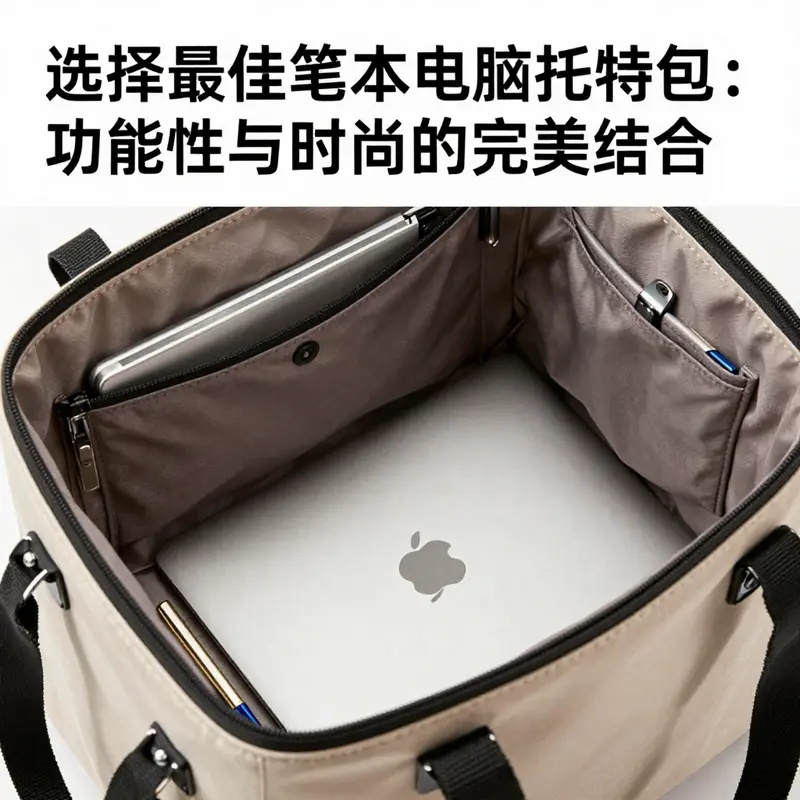
独立电脑隔层的设计对容纳效果影响很大。一个合格的隔层通常有软垫支撑并提供防滑内衬,能减少设备在包内滑动与相互碰撞。选择托特包时,请优先查看隔层是否存在以及其位置是否靠近包体中心。靠近中心的隔层更能在跌落或碰撞时分散冲击。若您选中的托特包没有内置隔层,也可以安装单独的电脑套或购买带缓冲层的内胆。但在这种情况下,余量应再增加0.5厘米以保证放入顺畅。
实际使用场景会影响您对余量的选择。短距离通勤且仅携带笔记本与几件轻便物品时,1厘米的余量通常足够。若经常在包内同时放入硬壳文件夹、移动电源或水杯,则建议采用2厘米或更大的余量,并优先选择带分区的款式。分区能防止设备与其他硬物直接接触,从而降低刮擦风险。
测量工具也会影响精度。软尺比金属卷尺更贴合曲面,能直观测取厚度与边框。若要更高的精确度,可在测量前把笔记本放平并把卷尺沿设备外缘轻压。记录时建议多测两次取平均值,以避免读数误差。此外,查询品牌官方规格是验证测量结果的重要手段。许多厂商会在官网公布完整的机身三维数据,直接用这些官方数字与托特包内部空间比对,能最大程度减少误差。
另一个常被忽视的点是托特包的开口设计与内部构造。开口过窄或没有拉链保护会让虽能放入的设备在取出时受阻,或在包内挤压。拉链式主袋和有翻盖保护的设计更利于设备安全。检查隔层顶部是否有固定带或魔术贴,这类固定设计能防止笔记本在单肩提起时滑出或晃动。
对轻薄型笔记本而言,薄的隔层和贴合设计看似合适,但若没有足够纵向余量,长时间摩擦会磨损机身边缘。对于厚重或游戏本类设备,优先考虑隔层深度和垫层厚度,厚垫能在意外跌落时起到缓冲作用。常见的缓冲材料包括闭孔泡沫和氯丁橡胶,它们在承受冲击时表现良好。如果托特包的隔层里衬是滑面布,建议内部另配防滑垫或选择内衬为绒布的款式,以减少设备在运输过程中的移动。
一个实用技巧是现场试装。若购于实体店,把笔记本与常携物品一并放入,来回模拟提携与放置动作。观察是否有卡顿,检查拉链拉合是否顺畅。电商购买时,查看商家是否提供退换服务或是否明确列出内部隔层尺寸。许多高质量托特包页面会标注“带电脑隔层”并给出隔层尺寸,你可以据此判断适配度。若页面信息不足,直接咨询客服并要求提供隔层的具体长宽深数据。
最后,记住测量和匹配不仅关乎放得下,更关乎保护和使用体验。精确测量机身长、宽、厚并包含脚垫;内部尺寸在三方向各留1–2厘米余量;优先选择带独立隔层并有防滑与缓冲设计的托特包。必要时利用官方规格验证测量结果,或现场试装以确认取放顺畅。采用这些方法,您将大幅提高挑选托特包的成功率,既能保证设备安全,又能保持日常使用的便利与美观。
更多关于如何在购买时确认电脑机身尺寸的权威说明,请参考以下外部资料:
https://www.sohu.com/a/xxxxx
同时,若想查看带电脑隔层款式的托特包示例,请参阅这篇关于带隔层托特包的指南: 带有电脑隔层的托特包。
守护笔记本的隐形护甲:托特包内置隔层的防护力学与日常应用
在笔记本携带的旅程中,托特包与背包的舒适性与健康影响对比

Carrying a laptop through daily life is more than a matter of appearance; it is a practical assessment of how a bag feels during miles of walking, waiting, and weaving through crowded spaces. When you choose between a tote bag and a backpack, you are measuring not only capacity but how weight travels on your body from the moment you step out the door to the moment you arrive at your destination. This chapter follows that logic with a focus on comfort, long-term health, and the role of design in protecting your laptop and your posture. The conversation begins with fit. A tote bag that truly fits your device must accommodate its actual width, height, and depth, not just the advertised screen size. The protection begins with the interior: a sleeve that can cradle the laptop with at least a half-inch cushion on every side, plus a surrounding buffer that shields it from bumps and jostling. A bag that relies on a thin fabric divider without padding may look sleek, but it invites micro-movements that can press a corner into the display or charger, especially on rough commutes or when the bag is set down on uneven surfaces. The takeaway is straightforward: measure your laptop carefully with a tape, compare those measurements against the bag’s internal specs, and ensure there is breathing room. A compartment that feels roomy on paper can still feel tight in use if padding compresses or seams bite into the device. The goal is not mere capacity but respectful space that preserves the device’s integrity while making daily access seamless. In this context, consider a tote with a built-in laptop sleeve as a practical baseline, but remember that padding, strap width, and the anti-slip interior are equally important to the experience. For readers who want a concrete visualization of a tote design that integrates laptop protection without sacrificing cushioning, you can explore a tote bag with a computer sleeve here: tote bag with computer sleeve. The emphasis is on forming a bag that can be relied upon for quick access and careful handling, especially when you’re juggling papers, a water bottle, and a charger along with the laptop. The strap configuration matters as well: a tote that can be carried by hand, slung over the shoulder with a gentle angle, or worn crossbody with a longer strap can distribute weight in a way that reduces peak pressure on any single joint. A few extra inches of strap width can dramatically alter how weight feels across the shoulder and neck, especially when your day includes a series of doors, stairs, and stops. This is why design details—strap geometry, weight distribution, and the way padding sits against the collarbone—are as critical as the bag’s outer aesthetic.
From the health perspective, the trade-off is clear and widely discussed in ergonomic practice. A tote that carries a laptop in a single-shoulder grip concentrates the load on one side. Over the course of a workday, this unilateral load can translate into neck tension, shoulder stiffness, and even mid- back discomfort if the bag is consistently heavy. The literature that informs clinical best practice consistently echoes a simple, practical guideline: avoid sustained unilateral loading beyond a modest portion of body weight. In real terms, this means being mindful of how heavy your daily load is and how often you switch sides during the day. A double-strap backpack, by contrast, is designed for balance. With two straps distributing weight across both shoulders, and often with a chest strap or a hip belt, it stabilizes the load and curbs sway when you move. If you routinely carry more than a light load, the extra stability can be a significant advantage. The American Academy of Orthopaedic Surgeons emphasizes that carrying weight beyond 10–15 percent of body weight on one side can raise the risk of muscle and skeletal strain over time. When translated to a practical commuting scenario, a person weighing 150 pounds (about 68 kilograms) could easily reach that threshold with a laptop, charger, water bottle, notebook, and documents if the pack is not distributed across two shoulders. This is not to say totes are inherently unhealthy; rather, their health impact hinges on how they are carried and how the weight is managed. If the day’s items push a tote beyond comfortable limits, or if the tote relies on a single long strap that sits tight against the neck, the benefits of elegance can be overshadowed by fatigue and postural strain. To provide balance in the narrative, it’s useful to acknowledge the more nuanced truth: bags are tools, and their impact is a function of design, use, and the surrounding body mechanics. A well-designed tote with broad, well-padded straps and a protected interior can offer an ergonomic alternative to sporadic backpacks, particularly for lighter loads, shorter commutes, or quick stops around the city. Conversely, for longer walks, stair climbs, or carrying multiple items, a backpack with stabilized harnesses offers a clearer path to comfort and ongoing health. The key is recognizing how weight and motion interact, then selecting the form that best suits the day’s tasks and your body’s response to movement. For readers seeking to ground this discussion in a broader ergonomic frame, consider the evidence from orthopaedic guidance on weight distribution and load management, which reinforces the idea that how you wear the bag matters at least as much as what you carry.
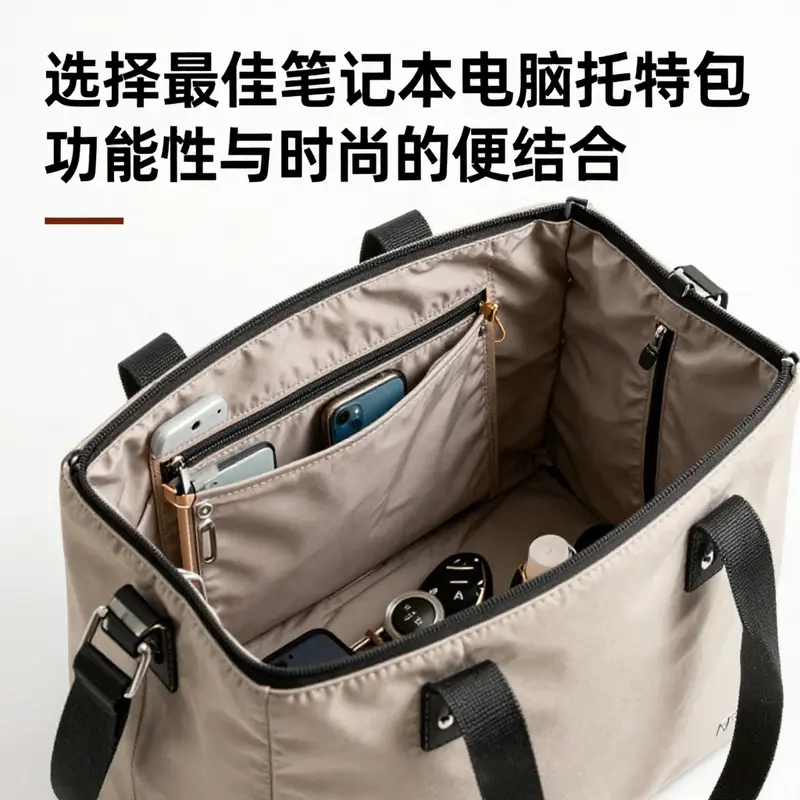
The practical advantage of the tote becomes clearer when we examine how its design supports organization and usability. A tote’s open top can improve accessibility, while also introducing a risk of items slipping out when the bag is in motion. The countermeasure is a thoughtful interior plan: multiple pockets for small items, a zipped main compartment for privacy or delicate documents, and a dedicated laptop sleeve that keeps electronics from contacting the bag’s otherwise soft interior. In a professional setting, this translates into fewer moments of rummaging, less time spent searching for keys or a phone, and a more confident, controlled experience when you are moving through crowded offices, airports, or coffee shops. The overall effect is not simply a matter of style; it is a practical improvement in everyday efficiency, which makes a case for totes in situations that call for quick access and minimal friction during transitions. It is also worth noting that the materials and construction of the bag contribute to long-term comfort. Durable, water-repellent fabrics maintain shape under load, while reinforced seams and robust hardware resist wear over months of daily use. In combination, these design choices sustain comfort and function without requiring traders to sacrifice form for function or vice versa.
Looking ahead, a final piece of the puzzle is context. The bag you choose should align with your typical routes and rhythms. If your commute includes a short walk, a tote with generous padding and a secure interior can deliver both accessibility and protection. If your daily routine involves long distances, frequent stair climbing, and a heavier payload, a backpack offers a balanced load that can reduce fatigue and promote better posture across hours of movement. In short, the best decision is situational: measure your laptop; assess your typical distance, terrain, and density of daily tasks; and then evaluate whether the bag’s design and carrying method will help you maintain comfort and healthy posture throughout the day.
For readers who want a concrete visualization of a tote design that integrates laptop protection without sacrificing cushioning, you can explore a tote bag with a computer sleeve here: tote bag with computer sleeve. This example demonstrates how padding, interior structure, and strap width can converge to create a bag that feels balanced, even when fully loaded with essential work items. As you reflect on your own routines, consider not only how much you carry, but where that weight sits and how you move with it. This awareness can guide you toward a tote that stays comfortable during a busy day, or toward a backpack when the day demands more stability and weight distribution. The ultimate aim is to preserve comfort, protect your equipment, and support healthy movement as you navigate the urban landscape.
External resource: For deeper biomechanical context on how these bag choices affect posture and comfort, see an external technical details page: https://item.jd.com/100123456789.html
null
null
Tailoring a Laptop Tote to Your Life: Weaving Form, Function, and Comfort Across Daily Scenes

Choosing a tote bag for a laptop is less about chasing a single universal spec and more about aligning a bag’s design with how you move through your days. The most satisfying choice feels obvious in practice because it behaves as a quiet partner: it holds a device securely, organizes the rest of your essentials without fuss, and stays comfortable whether you’re commuting, traveling, or enjoying a weekend out. When you approach this decision, imagine three pillars—the bag’s function, its protective features, and the way it carries your workload over time. Those pillars are not isolated; they braid together to form a seamless everyday tool. As you read, keep in mind that the right tote is not defined by a marketing claim of “fits a 15-inch laptop,” but by precise measurements, practical padding, and a design that harmonizes with your routines.
The first step is to gauge the actual size of your laptop, and this matters more than any marketing label. Measure the device’s width, height, and depth with a soft tape or ruler. Laptops can vary substantially in thickness due to hinges, ports, or chassis design, so rely on your measurements rather than the claimed diagonal screen size. The ideal interior should offer at least a half inch of clearance around the device. That extra space functions as a cushion, reducing pressure on the lid and preventing the laptop from rubbing against the seams. It also leaves room for a slim protective sleeve without forcing the bag to stretch beyond its intended shape. A practical note: always cross-check the internal dimensions the bag promises with your measurements, not just the advertised “fits up to 15 inches” line. This simple hydration of measurements prevents the disappointment that comes from a bag that seems right in theory but feels tight in practice.
Beyond the exact fit, the heart of a laptop tote is its internal protection. A true laptop-focused tote does more than separate the device from the rest of the items in the main compartment. It includes a dedicated sleeve or pocket with substantial padding—ideally at least half an inch thick—surrounded by a buffer that protects from all sides. A wraparound profile, where foam or neoprene cushions the top, bottom, and sides, helps absorb shocks during daily bumps and during transit when the bag may be jostled on trains or in crowded elevators. A non-slip interior lining further prevents the laptop from sliding, which can cause micro-movements that over time wear at the case or keyboard. Thin fabric dividers simply won’t suffice when you’re moving through a bustling city or juggling several errands; a robust, cushioned pocket is worth the extra weight and cost because it preserves the longevity of your device.
The way a tote carries weight is another crucial dimension. The classic one-strap tote looks sleek and effortless, but it concentrates load on a single shoulder. For anyone who carries more than a light load or endures long commutes, this can translate into neck, shoulder, or lower back discomfort over time. Comparative research and ergonomic guidelines consistently point to multi-strap designs as kinder to the spine and posture. A tote with reinforced handles and a sturdy shoulder strap that can be worn over the shoulder or carried by hand provides a reassuring degree of flexibility. If you’re balancing a laptop, charger, documents, and a few daily essentials, you’ll appreciate a bag that distributes weight across the torso rather than a single point of contact. A well-designed tote may also include an optional crossbody strap or a detachable shoulder strap, which reduces strain by offering different carry options without forcing you into a single posture for hours on end. The practical upshot is simple: when choosing a tote, consider how much you actually carry and how your body feels after a typical commute. A bag that remains comfortable with its straps and grip through a full day is a sign of a thoughtful design.
As important as fit and comfort are the tacts of organization and resilience. A tote’s interior should not resemble a single cavern of chaos but a well-considered workshop of pockets and dividers. Look for multiple internal sections to keep a phone, tablet, keys, and headphones in distinct places, preventing a frantic rummage every time you need something. A zippered main compartment or a hidden pocket adds a layer of security for sensitive documents or devices in crowded spaces. An adjustable or detachable shoulder strap gives you the flexibility to switch carrying styles on the fly, adapting to steps between train platforms or a quick dash through a concourse. Materials matter, too. Durable construction begins with a water-repellent exterior that can resist a sudden shower, a lining that protects against abrasion, and reinforced seams that survive daily use. A light but durable framework helps a bag hold its shape when loaded; a flat bottom with protective feet or a rigid insert keeps the bag from collapsing and makes the laptop easier to slide in and out. In short, you want a tote that behaves like a well-organized, weather-ready assistant, capable of keeping your laptop dry and stable while you navigate the rhythm of urban life.
Context matters as much as construction. The three core scenarios—commuting in a busy urban setting, traveling between airports and offices, and enjoying a casual, weekend routine—each reward different design intricacies. In a professional routine, a tote that leans toward a refined, understated aesthetic is helpful; a neutral palette can pair with a suit or a blazer while remaining quietly stylish. For travel, capacity and protection become paramount. A larger interior, more compartments, and waterproofing features meet the demands of packing for layers, a compact umbrella, and perhaps a small toiletry kit. In a casual life, personality and comfort often trump formal polish. Color, material texture, and a flexible carrying approach become the differentiators that make a tote your daily companion rather than a mere tool. Across these scenes, the common thread is that the bag should harmonize with you—your pace, your routes, and your style—without forcing you to adjust your daily rhythm to the bag.
With these criteria in mind, a practical approach to decision-making emerges. Start by identifying your primary use case: is your daily rhythm dominated by short commutes, or do you travel often? If your answer leans toward frequent movement and longer days, prioritize a tote with a robust protective sleeve, reinforced structure, and at least a modest amount of padding around the device. If your life is a blend of office days and spontaneous outings, a versatile tote with a well-organized interior and a detachable strap can adapt to both scenarios. For a weekend or leisure-focused routine, choose a tote that expresses your personality while still offering essential protection and a comfortable carry. The goal is not to chase the most features but to curate a cohesive set of attributes that aligns with your real-life use, ensuring the bag feels almost invisible in how it supports your day.
Among the practical signals you’ll recognize as you test options, pay attention to how the bag stands when empty. A bag that can stand upright, thanks to a rigid base or subtle structure, is easier to organize and less prone to tipping and spilling contents. Check the seams and hardware quality—zippers should glide smoothly, and any magnetic closures should hold without catching on fabric. Finally, consider the bag’s maintenance needs. A water-repellent exterior resists coffee splashes and sudden showers, while a wipe-clean interior reduces the time you spend on upkeep after a busy day. The right tote should feel quietly confident in its performance, not showy or fragile. When you find a design that meets these criteria—comfort, protection, organization, and a degree of personal charm—your choice isn’t just about a bag. It becomes a reliable partner for your laptop, one that travels as steadily as you do.
As a closing note, the path to choosing the right tote for your laptop can feel highly individualized. The insistence on one perfect model isn’t helpful because your life won’t be identical to someone else’s. The most responsible decision is to map your daily patterns, measure your device precisely, evaluate padding and weight distribution, and prioritize durability and flexibility. In doing so, you’ll arrive at a tote that holds your laptop securely, carries the rest of your essentials with ease, and sits comfortably at your side from morning train to late-night coffee.
Final thoughts
选择一款适合携带笔记本电脑的托特包,不仅关乎时尚,更是个人和职业生活的重要部分。通过对笔记本电脑尺寸的精确测量、对保护性能的重视、舒适度的比较、附加功能的评估,以及根据使用场景的合理选择,您能找到一款完美适合自己的托特包。无论是移动办公,还是参加重要会议,选择一款既能保护您的设备又展现个人风格的托特包,能为您的商务生活增添无穷便利与自信。